Senior Engineering Interview Handbook / Chapter 28
Accommodations, Accessibility, AI, and Tool Policies
A process chapter for senior candidates on requesting written interview instructions for accommodations, accessibility, AI use, coding tools, notes, and other policy-sensitive mechanics.
Preparing audio…
Audio edition
Accommodations, Accessibility, AI, and Tool Policies
Page tools
Make the interview environment explicit
An invitation for a remote practical round says, “Use your preferred editor.” That sounds clear until you inspect the editor. It contains ordinary completion, an AI coding extension, a cloud clipboard, a meeting transcriber, and the screen magnification you use every day. You also need live captions, but the invitation does not mention them.
There are two questions here, and they should not be collapsed into one. The access question is whether you can participate in the interview as designed, with an adjustment if necessary. The integrity question is which forms of help the company permits while it evaluates your work. Both affect the signal the interview produces. They often belong to different owners and may involve very different information.
Resolve them while there is still time to change the setup. Ask the right contact, get the answer in writing, configure the actual environment, and know what to do if interview day does not match the agreement.
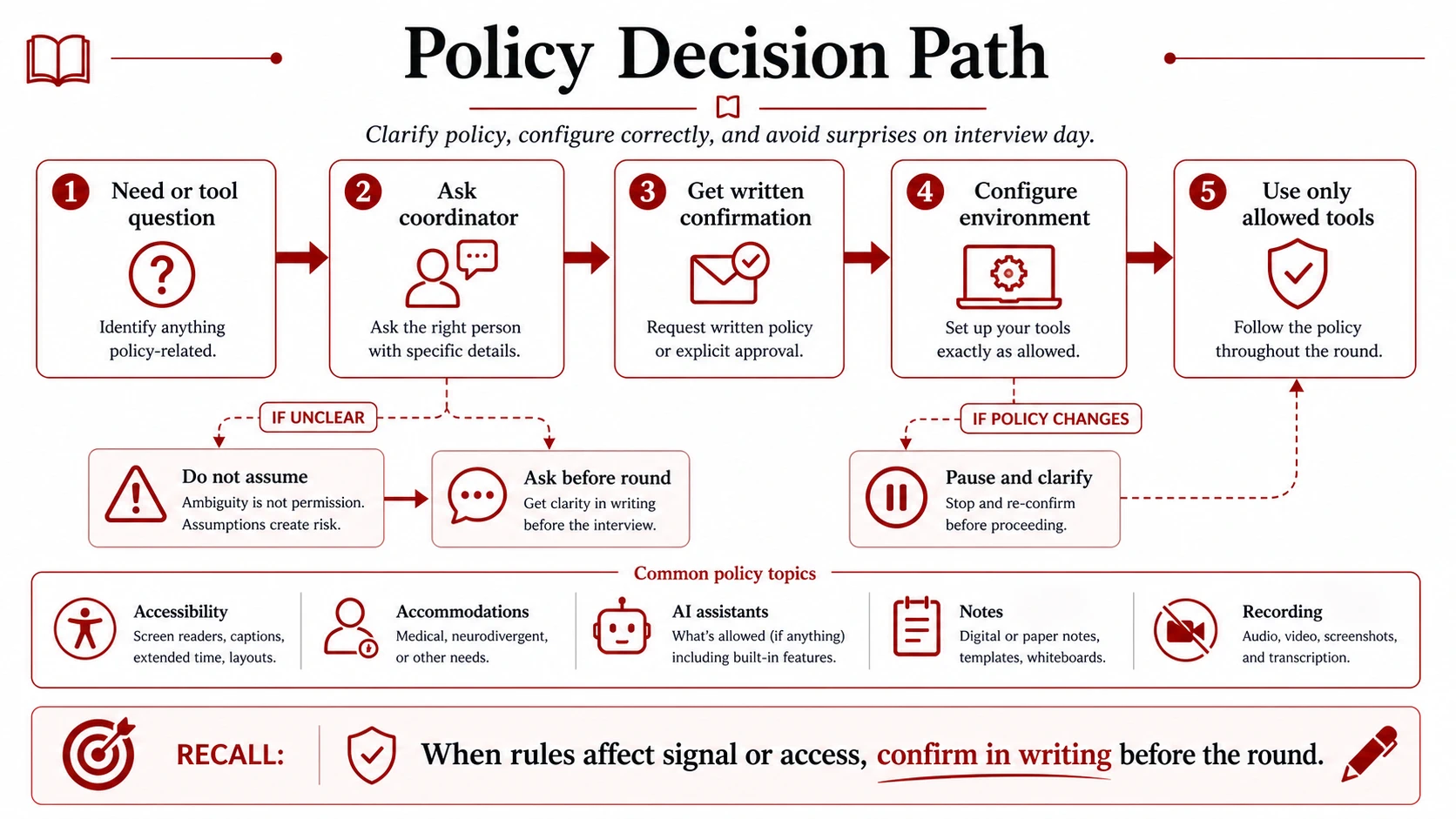
Two questions, two owners
General accessibility concerns the ordinary setup: whether prompts are readable, keyboard navigation works, captions can be enabled, audio is clear, and the interview platform works with the technology a candidate uses. Sometimes a coordinator or platform owner can answer those questions directly.
An individual accommodation is an adjustment to the hiring process. Depending on the person and the process, it might concern timing, breaks, an interpreter, an alternative format, assistive technology, the room, or the way an assessment is delivered. Ask the recruiter for the employer’s official accommodations route. That keeps any documentation and private information with the people responsible for handling it. The interviewer usually needs to know how to run the round, not a candidate’s diagnosis or personal history.
Tool policy is different. It establishes what the interviewers may attribute to the candidate. “Use your own editor” does not answer whether documentation, web search, snippets, ordinary autocomplete, AI completion, coding agents, personal notes, screenshots, recording, or help from another person is allowed. These boundaries have become harder to infer because ordinary editors, browsers, search pages, writing tools, and meeting applications now contain AI features.
Assistive technology should not be treated casually as forbidden outside help, and an AI coding agent should not be smuggled in under the label of autocomplete. Route the access need through the access process and the tool question through the written interview policy. The distinction protects both fair participation and the credibility of the work.
Ask while there is time to act
Return to the remote loop. Six days before it begins, the candidate sends two short messages.
To the recruiter:
Could you send the written tool policy for the practical coding and system design rounds? I would like to confirm editor choice, ordinary autocomplete, AI assistants or agents, documentation, web search, personal notes, recording, screenshots, and third-party help.
To the accommodations contact supplied by the recruiter:
For the remote rounds, I need live captions enabled and written prompts in the shared document. Please let me know the process for confirming those arrangements and testing the interview platform.
The first note names the uncertain tools instead of asking the nearly useless question, “Can I use my normal setup?” The second describes what must be true of the interview without broadcasting personal detail. If an official process requires further information, the candidate can provide it through that process.
Ask early because some changes require coordination: an interpreter must be scheduled, an assessment may need a different delivery path, an accessible room must be reserved, or a vendor may need to adjust a time limit. Early does not mean apologetic. It means there is still time for the answer to become real.
Platform questions also deserve a trial when possible. A vendor’s claim that its product is accessible is less useful than knowing whether the exact prompt, editor, run controls, and submission path work with the candidate’s setup. Ask for a practice environment or dry run when failure would be difficult to repair during the timed assessment.
Make the written answer operational
The recruiter replies:
You may use a local editor, syntax highlighting, ordinary autocomplete, tests, and official language or library documentation. Disable AI coding assistants, coding agents, meeting summaries, recording, screenshots, and third-party help. Personal notes are allowed for project discussions, but not prompt-specific solution templates.
The access contact confirms captions and written prompts. Those messages are not the end of the work. They are configuration inputs.
The candidate creates a clean editor profile with the AI extension and cloud helpers disabled. The meeting transcriber is off. Official documentation is bookmarked in a clean browser profile. Project notes contain facts and brief story prompts, not prepared solutions. The caption control is tested, and both confirmations are reachable without opening an unrelated account or exposing private correspondence on a shared screen.
Ambiguous words should be expanded before configuration. “Documentation” may mean official API references or it may include general search. “Autocomplete” may mean identifier and syntax completion or generated functions. “Notes” may mean a page of project facts or a library of pasted answer templates. “Recording” may include screenshots, local transcripts, browser extensions, and automatic meeting summaries. Ask the smallest question that makes the boundary executable:
The instructions allow autocomplete but not AI assistance. May I keep ordinary identifier and syntax completion enabled if I disable generated code and chat features?
Do not infer permission from silence. If an uncertain feature is not necessary, leave it off until the owner clarifies it. Do not disable an approved assistive tool merely because it also processes language or changes input; confirm that tool through the accommodations route so the interview team receives the correct instruction.
When interview day disagrees with the plan
At the start of the coding round, the interviewer says, “Use whatever you normally use.” The candidate’s written instructions are narrower.
Thanks. The written policy allows ordinary editor support and official docs, but asks me to disable AI coding assistants, so I am keeping this profile clean.
That sentence neither challenges the interviewer nor converts an informal remark into a new policy. If a necessary tool remains disputed, pause and ask the recruiter or coordinator to resolve it.
In the next round, captions are missing:
My access confirmation says captions will be available for the remote rounds, but I do not see them here. Could we enable them before starting, or contact the coordinator?
If the assessment platform does not work with the approved setup, name the specific failure and use the escalation route from the confirmation. If an AI panel or meeting assistant activates unexpectedly, stop it and say what happened. A brief factual account is safer than quietly continuing or giving a long defense:
My editor opened an AI completion panel. I have closed it because the written policy does not allow AI assistance.
The same response works across these mismatches: stop the clock if necessary, name the observed condition, refer to the written agreement, and ask for the next process step. The goal is not to litigate policy with an interviewer. It is to restore a fair, attributable round.
AI rules belong to the particular stage
There is no reliable industry default for candidate AI use. A company may permit AI during preparation, forbid it in a take-home, allow it with a usage log, or design a work sample in which using AI well is part of the task. Live coding, system design, behavioral interviews, application questions, and take-homes can each have different rules inside the same hiring process.
If the instructions do not clearly allow AI, do not use it for assessed work until the rule is clarified. When AI is permitted, the ordinary engineering obligations remain: keep claims truthful, understand and test the output, disclose use when asked, and do not send confidential prompts or company material to an unapproved third party. A candidate should be able to explain every submitted decision and every line of submitted code.
Public company guidance is useful only as an example of specificity. It does not travel to another company, and it may change between application and interview. Save the instruction that governs the current process instead of relying on a screenshot, an old forum answer, or the policy from a previous loop.
Confirm before the loop
Use this compact check when the schedule becomes concrete.
Access and tool policy checklist
- I know each round’s platform, duration, location, and required tools.
- I have the official route for any accommodation or access arrangement I need.
- The adjustment and any approved assistive technology are confirmed in writing.
- I have written rules for AI, autocomplete, documentation, search, notes, recording, screenshots, and third-party help.
- I have clarified any term whose meaning would change my setup.
- My editor, browser, meeting application, and assessment environment match the written rules.
- I have tested the actual platform with my access setup where possible.
- I can reach the confirmations without exposing sensitive information while screen sharing.
- I know whom to contact if access fails or the day-of instruction conflicts with the written policy.
The setup is ready when every visible support is approved, allowed, or absent. That is not bureaucratic perfection. It is the point at which the environment stops consuming attention and the interview can evaluate the work it intended to see.
Sources for current guidance
For legal or policy decisions, consult current sources for the relevant jurisdiction and company. Useful starting points include:
- EEOC: Job Applicants and the ADA
- Job Accommodation Network: Reasonable Accommodation During the Hiring Process
- W3C: Web Content Accessibility Guidelines 2.2
- PEAT: Ensuring Accessible Digital Interviews
- Anthropic: Guidance on Candidates’ AI Usage
The operating system is now complete: the response habits are rehearsed, the physical and cognitive setup is stable, and the external rules are explicit. The next part turns to coding, beginning with the language that will carry your reasoning under the clock.