Senior Engineering Interview Handbook / Chapter 26
Remote and In-Person Mechanics
A process chapter for senior candidates on controlling remote setup, onsite logistics, communication mechanics, contingency plans, and day-of interview execution.
Preparing audio…
Audio edition
Remote and In-Person Mechanics
Page tools
Make the work easier to see
The interview starts before the problem does. A browser asks for screen-sharing permission. The meeting app chooses the laptop microphone instead of the headset. The coding platform intercepts a familiar shortcut. Onsite, the only whiteboard is smaller than expected and one marker is nearly dry.
None of this measures engineering ability. All of it can obscure engineering judgment. When audio clips or a diagram becomes unreadable, the interviewer must spend attention reconstructing the medium instead of following the work. The candidate spends attention repairing the setup instead of framing the problem.
Good mechanics protect that shared attention. They make the prompt, artifact, and reasoning easy to follow; they also provide a modest way forward when the preferred tool or room does not cooperate.
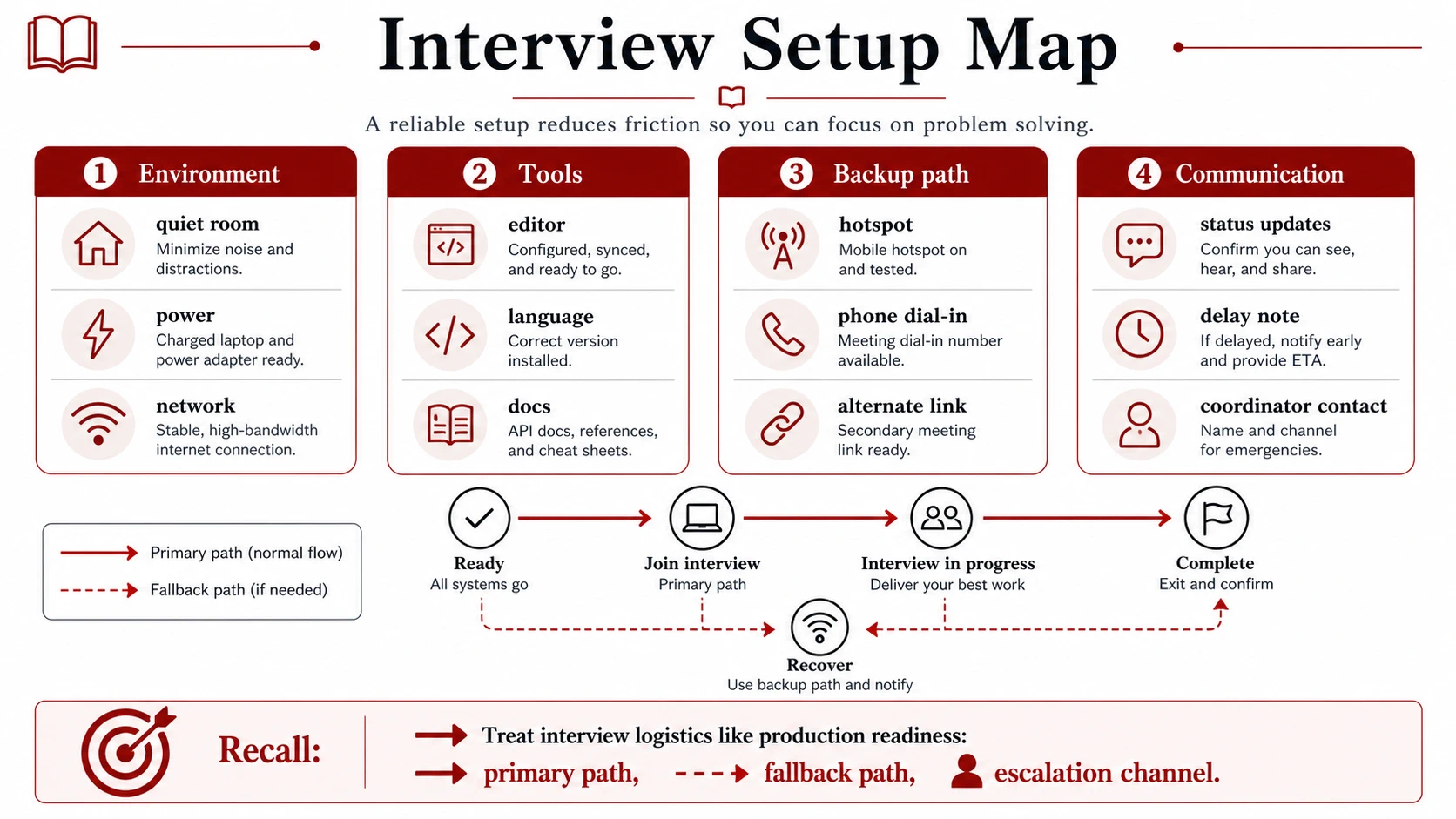
Learn the medium while there is still time to change it
An invitation that says “technical interview” has not told you enough to rehearse. As soon as the schedule arrives, identify the facts that change your preparation:
- the time zone, duration, round order, and planned breaks;
- which rounds are remote, onsite, or hybrid;
- the meeting link, dial-in option, and coordinator contact;
- the coding platform, shared document, local-editor policy, or company laptop requirement;
- the virtual or physical whiteboard expected for design;
- the rules for notes, references, calculators, assistive tools, recording, and AI assistance;
- the onsite address, entrance, identification requirement, and check-in process.
Ask about an unknown only when its answer will change what you do. A useful message is specific:
“Could you confirm whether the coding round uses a browser IDE, a shared document, or my local editor with screen share? I want to rehearse in the same environment.”
For design, ask which drawing surface will be used. For an onsite loop, ask about entry and what to bring. These are ordinary operating questions. Asking early gives the coordinator time to answer and gives you time to test the answer.
Policy questions belong here too. “I usually use this tool” is not permission. If the rules for notes, documentation, autocomplete, AI assistance, or local software are unclear, obtain an explicit answer before the round. Chapter 28 develops that boundary in detail.
Rehearse the remote path end to end
Testing isolated equipment is not enough. The microphone can work in the operating system and still be wrong in the meeting app. The editor can feel familiar until it runs inside a browser beside screen sharing. Rehearse the sequence you will actually use: join, share, read the prompt, create or edit an artifact, run or inspect something, and recover from an interruption.
Protect audio first
Video can become less sharp without ending the conversation. Broken audio destroys it.
Use the exact microphone, headset, and meeting application planned for the interview. Check the selected input inside the application and listen to a sample recording. If noise suppression is enabled, make sure it does not cut off quiet speech. Know where mute is, but avoid a keyboard shortcut that can be triggered accidentally while coding.
Frame the camera so your face is visible without forcing you to stare at your own image. Put the prompt and working surface near the camera if the layout allows it; then looking at the work does not look like looking across the room. Stable lighting matters more than elaborate lighting.
If bandwidth deteriorates, preserve audio and the shared artifact before video:
“The connection is becoming unstable with video on. I am going to turn the camera off so audio and screen sharing remain usable.”
The sentence explains the trade. It is better than silently disappearing from camera or waiting for every channel to fail.
Make the shared artifact obvious
Use a clean browser profile, desktop space, or operating-system account. Close mail, chat, calendars, password managers, personal tabs, unrelated terminals, and notifications. Keep only material you are allowed and willing to expose. If notes are permitted, a plain document is safer than hunting through a private knowledge base while the screen is shared.
The interviewer should be able to locate three things without asking: the prompt, the current artifact, and the latest result. In a coding round that usually means the prompt, code, and test output. In debugging it means the evidence, current hypothesis, and change under inspection. In design it means the constraints and the diagram or document.
Share one window or one deliberate workspace unless you have rehearsed a more complex arrangement. Increase the font before the call, not after someone says the code is hard to read. If you need to move between surfaces, announce the layout once:
“I will keep the prompt on the left, work in the editor, and show test output below it.”
That brief orientation turns window movement into part of the collaboration.
Use the interview editor, not your ideal editor
When a company specifies a browser IDE, practice in that browser IDE. When it permits a local editor, choose the simplest setup the interviewer can follow, not the configuration with the most personal automation.
Run a small problem before interview day. Check indentation, autocomplete, copy and paste, test execution, runtime availability, and how output appears to the viewer. Try the keyboard shortcuts you use without thinking. A shortcut captured by the browser, meeting app, window manager, or accessibility layer is best discovered in a rehearsal.
If the editor lags, stop typing into the delay:
“The editor is lagging after that run. I will pause input and explain the next test while it catches up.”
Continuing to type can create duplicate or misplaced edits. Silent waiting can look like a lost train of thought. A short status sentence avoids both.
Draw for the other screen
A virtual whiteboard offers an infinite canvas and invites an infinite diagram. Resist it. Begin with the few components needed to explain the main flow. Use large labels, label arrows, and number a sequence when order matters. Use color only when the color has a stable meaning.
Check the receiver’s view before detail accumulates:
“Is the diagram readable at this zoom?”
When a shared document replaces a board, headings can hold the conversation in place. A short sequence such as goal, constraints, interface, data, main flow, and risks is enough. It is an orientation aid, not a form that must be completed. Delete or ignore a heading that the problem does not need.
Arrive onsite with room to adapt
Onsite mechanics begin outside the interview room. Plan enough travel margin that weather, parking, security, and the elevator do not control your arrival. Follow the coordinator’s check-in instructions rather than arriving so early that the host must improvise around you. Keep the address, schedule, and contact details available even if the laptop or network is unavailable.
Bring the ordinary items you know you need: identification when requested, charger, glasses, medication, notebook, and pen. Water and a small bag may be useful; the exact list is personal. The governing rule is simpler: do not make the interviewer source an essential item you could reasonably have brought.
Once in the room, keep your bag, coat, and phone out of the working path. Ask before connecting a personal laptop or display. If you use a phone to reach a coordinator or retrieve entry instructions, say what you are doing and put it away afterward. An unexplained phone looks like a second conversation.
Take the room’s constraints as facts, not affronts. The interviewer may hand you an unfamiliar laptop, a small board, or a marker that needs replacing. You can ask what medium they prefer, test what is in front of you, and adjust.
Let the board preserve the argument
Write larger than feels necessary. Keep constraints in a corner, reserve most of the board for the main path, and leave some space for questions. Start at component level. Expand the storage, failure, or data path only when it becomes the subject of the conversation.
If the board fills, do not shrink the remaining work into a corner. Stop and choose what deserves to survive:
“The labels are becoming hard to read. I am going to preserve the main flow and redraw the retry path in a second panel.”
For code on a physical board, readable control flow is usually more useful than tiny, exact syntax. State the level of precision honestly:
“I will write language-shaped pseudocode so the control flow stays legible. In an editor I would verify this library call and run the boundary tests.”
That is a medium-aware choice only if you can still explain the data structures, invariants, and cases that exact code would need to satisfy.
When the medium fails, switch in public
A fallback is valuable only if you can reach it without abandoning the conversation. Use three moves: name the symptom, state the next path, and resume from a known point.
If audio clips, ask for the missing words rather than guessing: “The audio cut out after ‘cache invalidation.’ Could you repeat the last sentence?” If screen sharing is blocked, try the permission once, then offer the tested backup browser or shared document. If the network drops, rejoin and name the last shared point: “I lost connection while we were discussing the retry path; I am back there now.” If a marker is faint, replace it before the diagram becomes evidence no one can read.
The same discipline applies to being delayed onsite. Contact the coordinator through the provided channel with your location, cause, and realistic arrival time. Do not wait for hope to become a plan.
One apology may be courteous. Repeated apology consumes the time that recovery was meant to save. Once the switch is clear, return to the problem.
Run one rehearsal that can actually fail
A useful dry run is not another equipment inventory. Ask a peer, or use a second device as the receiver, and conduct twenty minutes in the actual environment.
Start from the meeting link. Share the intended workspace. Work through a small coding, debugging, or design prompt while the receiver checks audio, font size, diagram labels, and window movement. Halfway through, simulate one ordinary failure: disable the preferred microphone, stop screen sharing, add editor lag, or constrain the drawing surface. Name the symptom, switch to the fallback, and continue from the last shared point.
For an onsite design round, repeat the exercise on a small board or sheet of paper. Limit the first drawing to a few components and a labeled flow. The constraint teaches whether you can choose what belongs on the surface and what can remain in speech.
Afterward, fix only the friction that affected collaboration. A more elaborate setup can create more failure paths. The aim is not a control room; it is an unremarkable start and a recoverable interruption.
On the day before the interview, confirm that software and permissions still work, charge devices, save the contact path, and pack what you need. Avoid unnecessary upgrades or new tools. Shortly before a remote round, connect power, verify the selected microphone, open the allowed surfaces, silence notifications, and set readable fonts. Before an onsite round, finish calls and messages outside, follow the check-in window, and enter with enough slack to meet the room as it is.
Field reference
Keep the medium out of the way
- Confirm the format, tools, policies, timing, and contact path early.
- Rehearse the whole route: join, share, work, show a result, and recover.
- Protect audio and the shared artifact before video when bandwidth degrades.
- Keep the prompt, current work, and result easy for the interviewer to find.
- Test the actual editor, browser, shortcuts, drawing surface, and permissions.
- Make code and diagrams readable on the receiver’s screen or across the room.
- Prepare one fallback each for audio, network, sharing, power, and contact.
- Name a failure briefly, choose the next path, and resume from a known point.
- Onsite, preserve travel margin and adapt the artifact to the room.
Mechanics have done their job when they recede. The interviewer can remember the framing, code, diagram, trade-offs, and recovery rather than the meeting software or room. The next chapter turns to another finite resource around the work: the attention and energy that must last across the loop.