Solo Founder Product Engineering Handbook / Chapter 13
Workflow Discovery
Map the customer's real workflow deeply enough to find the painful slice a solo founder can solve without building the whole system.
Preparing audio…
Audio edition
Workflow Discovery
The Customer’s Process Is the Terrain
A founder usually starts with a product shape in mind. The customer lives inside a process.
That process is rarely clean. A request arrives in one tool, gets copied into another, waits for a person with authority, detours through a spreadsheet, depends on an informal rule, and produces an output that someone else has to trust. The customer does not experience this as a feature gap. They experience delay, rework, confusion, exposure, embarrassment, or lost money.
Workflow discovery reconstructs that process before you design the product. It asks a harder question than “What problem do they have?” Where, inside the actual work, does the problem become painful enough that a small product could earn trust?
For a solo founder, this is a question of survival. Every actor, permission, data format, approval, exception, notification, integration, and audit trail can become permanent surface area. The first product should not absorb the whole workflow. It should intervene at one painful, supportable point where the customer can feel the difference.
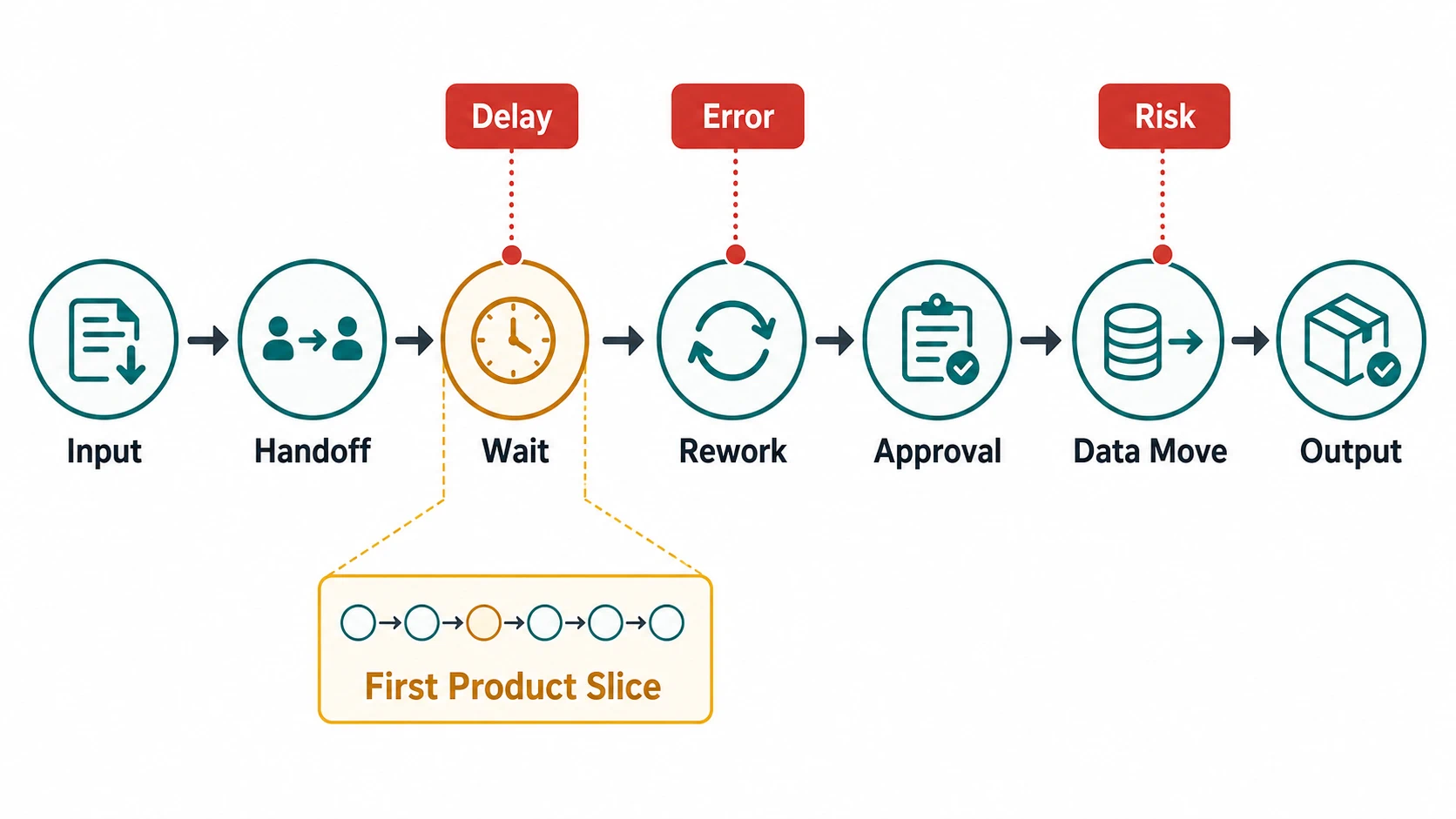
Stay Inside One Episode
Take the strongest recent episode from a problem interview and slow it down. Do not ask how the process is supposed to work. Ask the customer to replay what happened from the event that started the work to the output that counted as done.
Begin with the trigger. What arrived: a request, file, alert, message, complaint, or deadline? Who noticed it? What made this instance routine, urgent, or strange? Then keep asking what happened next. Who touched the work? What did they need before acting? Which tool did they open? Where did the information go? Who waited, checked, approved, copied, reconciled, or entered it again?
Customers will jump from chronology to commentary: “Approvals are always a mess” or “The spreadsheet is terrible.” Bring them back gently. Ask what happened immediately before the approval, who sent it, what the approver saw, and what returned afterward. The same complaint on opposite sides of a handoff can imply different products.
Ask to see the actual spreadsheet, message, report, checklist, or export when the customer is allowed to share it. Do not request sensitive records they cannot disclose. An empty template or a description of its fields may be enough to reveal the process without exposing customer, employee, patient, or financial data.
Put the Work on the Page
Write the first map in plain language. For every step, record an actor doing an action in a tool, turning an input into an output. Join the steps in the order they occurred. Accuracy matters more than a polished diagram.
The actor is not only a job title. Note who performs the work, who approves it, who depends on the result, who pays for change, and who can block it. One person may hold several of those roles in a small company; separating the roles still reveals where adoption or permission can fail.
Name the tool precisely enough to expose the operation. “They use Salesforce” is less useful than “the coordinator exports open cases, filters them in a spreadsheet, and pastes the overdue rows into Slack.” Email threads, messaging channels, calendar reminders, private checklists, and a manager’s memory belong on the map beside official systems.
Inputs and outputs make handoffs visible. A PDF becomes a spreadsheet row; a spreadsheet row becomes an exception note; the note becomes an approval request. When the output of one step is incomplete, stale, or ambiguous, the next person compensates with a manual check. That compensation is part of the workflow, not an untidy detail to erase.
Draw a handoff when responsibility changes. Draw data movement when information is copied, transformed, exported, or re-entered. Mark an approval where progress depends on authority, and a loop where rejected or incomplete work travels backward. A map with these movements can show why a two-minute action takes two days.
Mark Where the Work Resists
Once the sequence is honest, mark what happened at each step. Use ordinary words: waited, copied twice, could not tell, checked manually, asked the manager, corrected, sent back, customer complained. These marks preserve the consequence better than a generic severity score.
Look for clusters. Delay beside an approval may be a routing or visibility problem. Rework after data movement may indicate a bad format, missing validation, or an unreliable source. A step known only to one experienced employee may need decision support before it can tolerate automation. Panic around a customer-facing deadline may make confidence and triage more valuable than raw speed.
Do not convert every mark into a requirement. Context switching across three tools could justify consolidation, or it could conceal integrations that a one-person company cannot support. A slow manual review could be waste, or it could be the control that prevents an expensive false approval. The mark tells you where to investigate; the consequence tells you whether there is value.
Trust deserves its own annotation. Where could a silent error cause money to move, a schedule to change, a client message to go out, or a compliance record to be submitted? At that point, ask what evidence the reviewer needs, who is allowed to decide, how a mistake is corrected, and whether the action can be reversed. Those answers determine whether the product may automate, should draft, must show sources, or should refuse.
The Invoice Exception That Shrinks the Product
Consider a fictional composite. A founder is studying invoice exceptions at small freight brokers and arrives with the outline of an AI accounts-payable product. Interviews confirm that invoices arrive in inconsistent formats and that operations staff spend too much time explaining discrepancies. The idea still sounds broad enough to consume a company.
A coordinator reconstructs one recent exception:
Carrier emails PDF invoice
  -> coordinator checks route and weight in a TMS export
  -> coordinator compares an accessorial charge with a rate sheet
  -> mismatch goes into an exception spreadsheet
  -> coordinator searches prior notes and drafts an explanation
  -> manager reviews the sources in an email thread
  -> approved or disputed status is entered in the accounting system
The official systems sit at the ends of the trace. The difficult work happens between them. The coordinator moves data among a PDF, an export, a rate sheet, a spreadsheet, notes, and email. The manager cannot approve merely because a mismatch exists; the explanation must connect the charge to a route fact and a contract term. If the explanation is weak, it travels backward for rework. While it waits, payment waits too.
The painful cluster is not invoice entry. It is mismatch explanation. Coordinators can see that something is wrong, but reconstructing why requires scattered context and manual judgment. The first value moment is therefore smaller and more exact than “invoice processed”: a manager can approve or dispute an exception in two minutes because the explanation is clear and sourced.
That changes the product. It also gives the founder a way to test value without replacing accounting, integrating every carrier portal, or pretending invoice extraction is already reliable.
Hidden Work Explains Why the Workflow Survives
Customers often describe the official path first. Follow the places where reality departs from it: the second spreadsheet created because the first cannot be trusted, the saved email template, the screenshot sent as proof, the Slack thread where exceptions are resolved, the assistant who cleans data, or the private checklist a manager uses before approval.
This hidden work is tacit product design. It may preserve state the official system loses, supply memory, route an exception, or make responsibility visible. It can reveal a narrow opportunity that an incumbent misses because the work falls between product boundaries.
It can also be a warning. A spreadsheet may survive because its columns change with every exception. A side channel may exist because the formal record is politically sensitive. A manual approval may protect against a rare but costly error. Before automating hidden work, ask what constraint caused it and what would break if it disappeared.
This is why workflow discovery is deeper than collecting complaints about tools. The workaround shows both the missing capability and the local knowledge a replacement would have to respect. Whether customers care enough to switch is a separate decision; first you need to understand what their untidy system is doing for them.
Choose the First Value Moment
A first product slice is not the smallest feature you can code. It is the smallest intervention that reaches a painful value moment in the real workflow.
The slice needs a specific actor, an accessible input, a useful output, and a trust standard. It also needs a boundary that keeps the rest of the workflow outside the product. Write those choices in one sentence:
The first version helps [actor] do [workflow step] using [available input] so that [value moment], while [manual or excluded boundary].
For the freight workflow, the sentence becomes:
The first version helps freight operations coordinators turn invoice mismatches into sourced approval summaries, using forwarded invoice PDFs and uploaded route exports, so managers can approve or dispute exceptions without reconstructing the charge from scratch, while the coordinator verifies uncertain matches and the accounting system remains the system of record.
This slice is more serious than a demo and much smaller than an accounts-payable platform. It can be tested with forwarding and uploads before deep integrations. It preserves manager approval. It refuses automatic payment, broad portal coverage, every invoice type, and replacement of the accounting system.
The refusal is part of the design. If you cannot name what stays outside, the workflow is still choosing the product for you.
Keep Manual Work Where It Teaches
Manual work is useful during discovery when it exposes edge cases, preserves judgment, or delays an expensive integration until value is proven. A founder can review uncertain extraction, classify exceptions, or assemble the first summaries behind the scenes while the customer receives a clear and reliable outcome.
Be honest about that work. Record how often it occurs, what judgment it requires, and whether the same patterns repeat. If every customer needs private interpretation, custom data cleanup, or founder intervention that cannot be bounded, you may be discovering a service business rather than a software wedge.
Automate when the step is repeated, understood, low in judgment, observable, and costly enough that speed or consistency changes behavior. In high-stakes legal, medical, financial, payroll, safety, or compliance work, narrow scope does not relax the standard of care. Keep qualified people in control, preserve source visibility, and make failure behavior explicit.
Treat integrations the same way. “It must integrate with our system” is not yet a requirement. Which object or file is needed? Which fields? On which event and at what cadence? With whose permission? What happens when the data is late, malformed, duplicated, or unavailable? An upload or export may answer the first product question before an API connection is justified.
Decision Gate
The map is ready to guide scope when you can tell one recent episode from trigger to final output without hand-waving. You can point to the step where delay, error, rework, risk, ambiguity, or customer impact concentrates. You know the actor who feels that moment, the approver who must trust the result, and the buyer or blocker who can determine adoption.
You can also name the inputs the product can actually obtain, the output the customer would recognize as valuable, and the trust point that requires evidence, review, reversal, or refusal. Finally, you can say what remains manual and what the first version will not attempt.
If every step seems painful, narrow the customer segment or reconstruct a more specific episode. If the value moment requires broad integration, many roles, or high-stakes correctness before the customer sees any benefit, the proposed slice is still too large. If you cannot write the slice sentence, the missing noun usually tells you what to investigate next: actor, input, output, value, or boundary.
Field Reference
Carry one blank page into a workflow conversation. At the top, write the customer segment, the recent episode, its trigger, and the final output. Down the page, trace each actor, action, tool, input, and output in order. Mark handoffs, waits, rework loops, data movement, exceptions, approvals, and trust points where they occur.
At the bottom, write only four conclusions:
- the step where pain clusters and its consequence;
- the first value moment the customer could observe;
- the work that can remain manual while you learn;
- the explicit boundary of the first product.
Then write the slice sentence. A difficult sentence is not a prompt to add features. It is evidence that some part of the workflow remains unknown.
Exercise
Choose one interviewee and one recent episode. Draw the workflow from trigger to final output. Include the unofficial tools and people, not only the process the company claims to follow. Mark every handoff, wait, rework loop, data movement, exception, approval, and trust point.
Beside the map, list the product surfaces required to automate the whole workflow: roles, permissions, integrations, formats, notifications, settings, reporting, audit, support, and edge cases. Then circle one painful value moment and write a first product slice that can reach it while leaving the rest of the workflow alone.
The map has done its job when it makes a product smaller for reasons the customer would recognize. The remaining question is whether it improves on the current workaround enough to justify the risk of trying something new.