Production Data Systems Handbook / Chapter 41
Backup, Restore, Disaster Recovery, and Business Continuity
Design recovery around proven restores, explicit RPO and RTO targets, dependency order, protected backups, drills, and business fallback modes.
Preparing audio…
Audio edition
Backup, Restore, Disaster Recovery, and Business Continuity
Backups Are Inventory, Restores Are Capability
Backups often look reassuring from a distance. A job runs every night. Snapshots appear in a console. A cross-region copy exists. A dashboard says the last run succeeded. None of that proves the business can recover. It proves the team owns some inventory that might become useful during an incident.
Recovery capability is different. It means the team can choose the right recovery point, restore the right slice of data, bring dependencies back in a safe order, verify that the restored state is trustworthy, and keep the business operating while the technical work happens. The useful question is not “Do we have backups?” It is “What facts can we restore, from which point, by whom, into which environment, within what time, with what evidence, and with what user-facing compromise?”
Two promises anchor that conversation. Recovery point objective, or RPO, is the maximum data loss the business is willing to tolerate. Recovery time objective, or RTO, is the maximum time the business can tolerate the system, data product, or workflow being unavailable or degraded. A backup policy that does not name both is an infrastructure habit, not an operating promise.
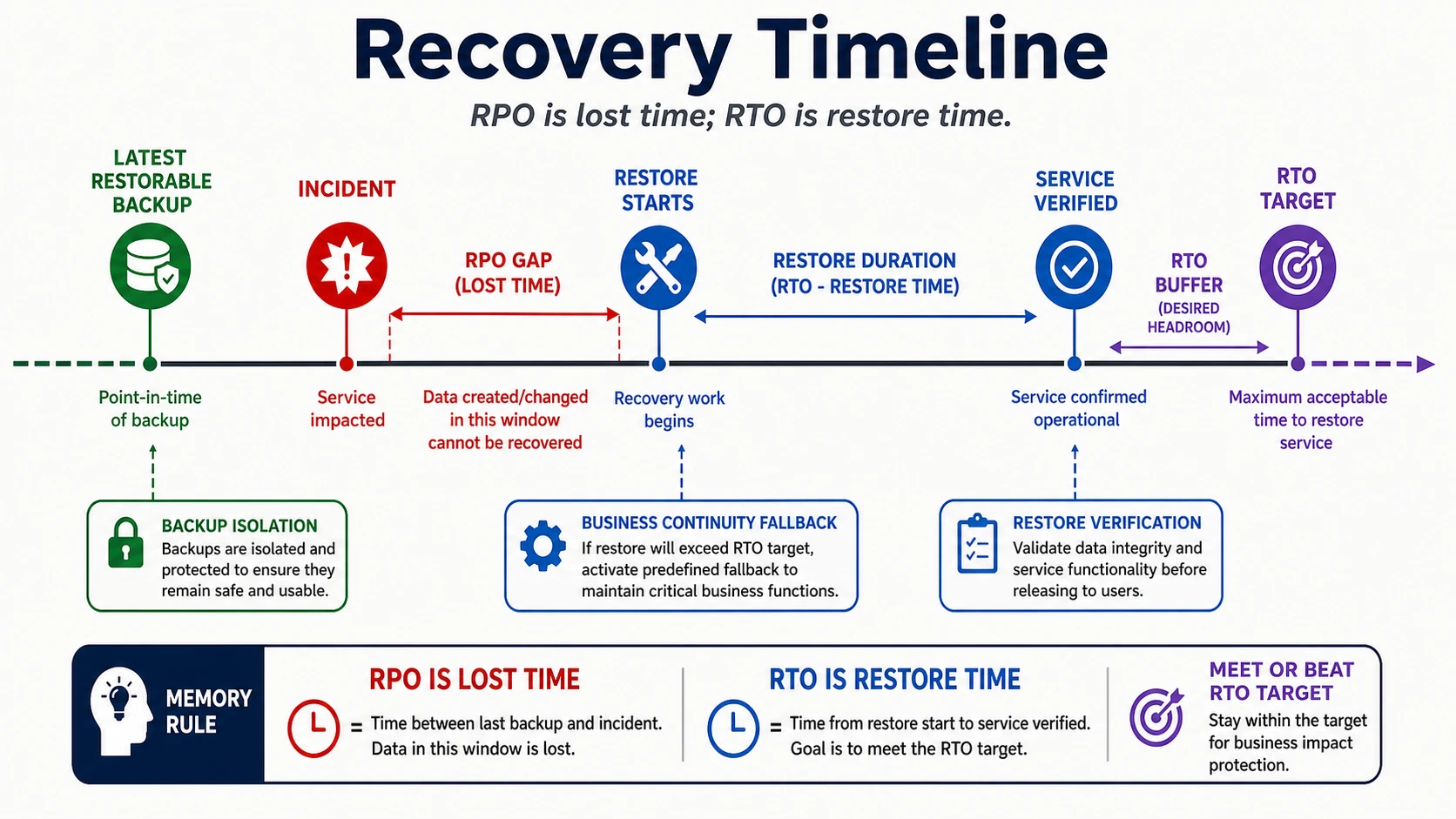
Backup design is incomplete until restore proof, dependency order, verification, and business continuity turn stored copies into an operational capability.
Recovery Promises Start with Data Classes
Do not start recovery planning with storage products. Start with data classes. A payment ledger, shopping cart, user-uploaded object, audit log, search index, cache, analytics model, and recommendation feature table do not deserve the same recovery promise simply because they happen to live near each other.
For each data class, name the business meaning of the data and the consequence of losing or delaying it. Payment and entitlement records may need near-zero loss and careful reconciliation. A search index can often be rebuilt from the source of truth, but users may need a degraded search mode while it catches up. A warehouse model used for weekly analysis may tolerate longer lag than a fraud signal used to block a transaction. A cache may be disposable, except when a team has accidentally made it the only place a computed value exists.
This classification keeps recovery spending honest. Strict RPO usually costs money and complexity: continuous log archiving, change capture, replicated storage, stronger monitoring, and more frequent restore validation. Strict RTO usually costs a different kind of money: automation, warm capacity, tested failover, rehearsed access, and dependency readiness. Loose promises are not irresponsible when the data class can tolerate them. Unstated promises are irresponsible because incidents will assign the cost after the fact.
Vocabulary That Changes Decisions
A backup is a retained copy used for recovery. It might be a logical dump, physical snapshot, storage-level copy, exported table, object copy, continuous log archive, or provider-managed backup. The format determines what can be restored, how quickly, how precisely, and with what verification.
A snapshot captures state at a point in time. It can be fast to create and fast to restore, but it may also restore a large blast radius when the team only needs one tenant, one table, or one object prefix. Point-in-time recovery combines a base backup with a journal such as write-ahead logs, binlogs, change records, or another ordered mutation stream so the system can restore to a chosen moment.
A replica is not a backup by itself. Replicas are excellent for read scale, failover, and reducing some hardware-failure recovery time. They are poor protection against mistakes that replicate quickly: accidental deletes, bad migrations, application bugs, corrupted writes, compromised credentials, or a script that overwrites valid data. If the failure flows through the same replication path as legitimate writes, a replica preserves the failure with impressive speed.
An archive is not the same promise as an operational backup. Archives are usually optimized for retention, audit, cost, or historical analysis. They may be slow to retrieve, hard to query, or shaped differently from the live system. An archive may satisfy a record-retention need while being useless for a one-hour service recovery.
Granularity is a design choice. Full-system restore, database restore, table restore, tenant restore, object restore, message replay, and derived-store rebuild each carry different risks. Restoring the whole system may be safest after broad corruption. It may be reckless after one tenant was deleted, because it rolls everyone else back to solve one customer’s problem.
Backup Policy Is a Risk Register
A backup policy should read like a risk register, not a calendar. Frequency follows RPO. Retention follows business, debugging, dispute, audit, privacy, and cost needs. Storage location follows the failures the backup must survive. Access policy follows the sensitivity and abuse potential of the data. Verification follows the questions the team must answer before handing service back to users.
Consider a customer-facing order system. The order database may need continuous log archiving because losing accepted orders creates fulfillment, support, and revenue damage. Uploaded receipts may need object-versioning or immutable object copies because users expect their files to survive application bugs. The support search index may not need a backup if it can be rebuilt quickly from orders and users, but the rebuild capacity and source retention must be proven. The analytics warehouse may keep longer historical copies, but its RTO may be measured in hours or days rather than minutes.
Protection is part of the policy. Backups should be encrypted, access-controlled, monitored, and isolated from the failures that destroy the primary system. A backup that can be deleted by the same compromised credential, automation bug, or account-level mistake that damaged production is not an independent recovery source. Immutability, separate credentials, separate administrative paths, and tested key recovery can matter more than another copy in the same blast radius.
Retention has trade-offs. Long retention helps with slow-discovered corruption, delayed customer disputes, audit requests, and forensic analysis. It also increases cost, privacy exposure, search obligations, and the chance that deleted or sensitive data remains in places the product team forgets. Short retention reduces exposure and storage cost but may leave the team unable to diagnose or recover from a defect discovered weeks later. The policy should distinguish operational backups, long-term archives, audit evidence, and data that must expire.
Restore Design Names the Order of Return
The restore procedure is where recovery promises become concrete. It should answer three questions before any incident occurs: what comes back first, what must stay paused, and what proves users can return.
Dependency order is usually the hidden failure. An application may need identity, secrets, network policy, primary data store, schema version, object storage, message broker, idempotency table, feature flags, search index, cache warmup, observability, and support tooling before it can safely accept traffic. Restoring the database first is not wrong, but it is rarely sufficient. If consumers resume before idempotency records are restored, replay can duplicate side effects. If application code expects a newer schema than the restored database contains, startup can corrupt the recovery. If search comes back before deletes are replayed, users may see records that should no longer be visible.
Write down the order as an operational sequence:
- Freeze or fence the damaged writers so the team stops adding uncertainty.
- Preserve evidence: logs, backup metadata, migration history, queue offsets, and the suspected failure window.
- Choose the recovery point based on the failure, not merely the newest backup.
- Restore source-of-truth data into an isolated environment when possible.
- Verify schema, invariants, checksums, counts, representative reads, and sensitive-data protections.
- Decide whether queues, consumers, derived stores, indexes, and caches are restored, replayed, rebuilt, or discarded.
- Resume writes deliberately, with reconciliation and monitoring already active.
That sequence is intentionally slower than “click restore and route traffic.” Recovery work changes production truth. Speed without fencing and verification can turn a localized data loss into a broader corruption incident.
A Production Restore Walkthrough
Imagine a SaaS product where a support automation accidentally deletes all records for one large customer. The primary database has point-in-time recovery. The product also uses object storage for attachments, a search index for support, a queue for billing events, and a warehouse for customer reporting.
The wrong response is a full production rollback to the minute before deletion. That would restore the affected tenant, but it would also erase legitimate writes from every other tenant after that point. The business would trade one incident for many silent losses.
A better plan starts by fencing the affected tenant’s write paths and preserving the deletion window. The team restores the database to an isolated environment just before the deletion, extracts only the affected tenant’s records, compares them with current production state, and prepares a targeted repair. Attachments are checked separately because database rows may reference object keys that were not deleted. Billing events are not blindly replayed; the team verifies which side effects already occurred and which need repair. Search is rebuilt for the tenant after source truth is corrected. Warehouse tables are marked stale for that tenant until the next safe rebuild or backfill.
The verification is not “the rows are back.” It includes tenant-level counts, referential integrity, business invariants, sample workflows, support search, billing reconciliation, attachment access, audit trail, and confirmation that no other tenant was rolled back. The continuity question is also explicit: while recovery runs, can the tenant read existing data, submit new work, use a manual intake path, or receive a support message that names the affected workflows without making promises the team has not verified?
This example shows why restore granularity matters. A system that can only restore the world forces the business into all-or-nothing decisions. A system that can restore a tenant, table, object prefix, time range, or derived view gives operators a smaller blast radius.
Disaster Recovery Patterns Are Business Choices
Disaster recovery patterns trade cost, complexity, data loss, downtime, and operating burden. The right pattern depends on the workload promise.
Active-passive recovery keeps a secondary environment ready to receive restored or replicated data. It is easier to reason about than multi-writer designs, but the team must drill failover, failback, DNS or routing changes, secret availability, capacity, schema drift, and dependency readiness.
Pilot light keeps only the minimum recovery foundation alive: network, identity, automation, storage, configuration, and a thin service skeleton. It can be cost-effective for systems with moderate RTO, but it depends on automation that has been tested under realistic data volume and missing-owner conditions. A pilot light that takes two days of manual repair to ignite is documentation, not readiness.
Warm standby keeps a mostly running copy of the system with replicated data and enough capacity to scale during failover. It can reduce RTO, but it increases cost and doubles the surfaces that can drift: configuration, indexes, permissions, secrets, migrations, observability, and operational knowledge.
Active-active systems serve traffic from multiple regions, clusters, or stores at once. They can reduce some regional-outage impact, but they are not an escape from recovery design. They add conflict resolution, global consistency choices, routing failure modes, data residency questions, split-brain risk, and harder incident diagnosis. If the application cannot explain what happens when two regions accept conflicting writes, active-active has moved the recovery problem into the correctness model.
The pattern should be selected after the team states the data classes, RPO, RTO, write topology, user promises, regulatory constraints, cost ceiling, and operator skill. A billing ledger, collaboration document editor, internal reporting warehouse, and image hosting service may all deserve different answers in the same company.
Restore Drills Produce Evidence
A restore drill is not a meeting where people agree the runbook looks plausible. It is an evidence-producing operation. The evidence should include the scenario, backup identity, selected recovery point, target environment, operator, procedure version, elapsed time, restored data volume, verification checks, defects found, and follow-up owners.
Drill scenarios should vary because recovery failures vary. Practice accidental deletion, bad migration, corrupted table, lost object prefix, compromised credential, region loss, delayed data-quality discovery, queue replay after outage, and recovery when the primary service owner is unavailable. The annual full restore is useful, but it does not test the tenant-level, derived-store, and business-continuity cases that often decide the real incident.
Use drills to calibrate the promises. If the recovery target says one hour and the fastest verified restore takes four, the RTO is fiction. If the target says fifteen minutes of data loss and the last restorable point is six hours old, the RPO is fiction. Fictional promises are worse than loose promises because they cause product, finance, support, and incident leaders to plan from false safety.
The drill should also test access. Can the on-call engineer find backup metadata? Can they reach the restore environment? Can they decrypt the backup? Can they get break-glass approval if the normal approver is unavailable? Can they prove what they did afterward? Recovery access should be controlled and audited, but it must be usable during the hour when the business needs it.
Business Continuity Keeps the Company Working
Technical recovery and business continuity overlap, but they are not the same job. Technical recovery restores trustworthy systems. Business continuity keeps critical work moving while recovery is incomplete.
A continuity plan names what the product, support team, finance team, operations team, and customers can safely do during each recovery state. Some systems can enter read-only mode. Some can accept requests into a durable queue while fulfillment is paused. Some can use manual approval, spreadsheet intake, phone support, delayed settlement, cached catalog browsing, or a static status page. Some workflows must stop because accepting new work would create unresolvable inconsistency.
The plan should be honest about degraded mode. Read-only mode is useful only if the reads are trustworthy. Manual fallback is useful only if the manual records can be reconciled into the source of truth later. Queueing new requests is useful only if users understand delayed processing and the queue can survive the incident. Customer communication is useful only if it states impact, safe actions, expected updates, and known limits without inventing recovery times.
Continuity plans should also name contractual, regulatory, and customer-trust constraints without letting engineers improvise legal conclusions during the incident. Some workflows may require approved message templates, evidence retention, privacy-owner review, financial controls, or formal business approval before degraded operation is acceptable.
Continuity also changes restore priority. During a regional outage, restoring admin access, support lookup, status communication, and billing reconciliation may matter before restoring every background job. During a data corruption incident, freezing writes and preserving evidence may matter more than returning service quickly. The recovery plan should let incident leaders make these trade-offs without improvising the entire business process.
The Recovery Plan
Write a recovery plan for each critical data class, and begin with identity rather than machinery. Name the business fact, its source of truth, the workflows that depend on it, and the team accountable for bringing it back. State the RPO and RTO as approved business promises, not values inferred from the current backup schedule.
Then describe the recovery source precisely: format, frequency, retention, encryption, isolation, immutability, monitoring, and key-recovery path. Say whether the useful operation is a full restore, point-in-time restore, tenant or table extraction, object recovery, replay, or rebuild. These details should make clear which failures the backup survives and which recovery shapes it cannot support.
Put return to service in order. Cover identity, secrets, network, schema, primary data, objects, queues, consumers, derived stores, caches, observability, and traffic routing where they apply. Alongside that sequence, name the stop conditions: when writers remain fenced, consumers stay paused, security joins, failover is abandoned, higher approval is required, or users must remain out.
Finish with proof and continuity. Define the integrity checks, invariants, counts or checksums, representative workflows, reconciliation, access checks, and sign-off required before traffic returns. Record the last drill’s recovery point, elapsed time, defects, evidence location, owner, and next date. While that work proceeds, state whether the business can operate read-only, degraded, queued, manually, or only through communication, and explain how any temporary records will be reconciled.
Review the plan after incidents, major migrations, schema or dependency changes, and restore drills. It is ready only when an operator who did not write it can use it in a drill and produce evidence that the restored system is safe for the business to trust.
Exercises
Design recovery for a product that uses a transactional database, object storage, search index, event queue, cache, and analytics warehouse. Classify each data class by source of truth, RPO, RTO, backup method, restore granularity, and continuity mode. Decide which stores are restored, which are replayed, which are rebuilt, and which are disposable.
Run a tabletop for accidental tenant deletion. Name detection, write fencing, recovery point selection, isolated restore, tenant extraction, side-effect reconciliation, derived-store rebuild, verification, customer communication, and the criteria for reopening writes.
Run a second tabletop for region loss. Decide whether the recovery pattern is active-passive, pilot light, warm standby, or active-active. Then prove the dependency order: identity, secrets, network, data, schema, queues, consumers, observability, support tooling, and traffic routing.
Production Review Questions
A recovery program is production-ready when the team can answer these questions from evidence:
- Which facts can the business afford to lose, and which must be recovered nearly exactly?
- What is the last verified recovery point for each critical data class?
- How long did the last realistic restore take, including verification and dependency return?
- Which dependencies must be restored, paused, replayed, rebuilt, or kept offline?
- Who can perform recovery, with what access, when the usual owner is unavailable?
- What can users, support, finance, and operations safely do while recovery is incomplete?
Backups store possibilities. Restores prove capability. Business continuity decides whether that capability is enough for the company to keep its promises under stress.