Cybersecurity Engineering Handbook / Chapter 56
Corporate IT and Endpoint Playbook
Control workforce identity, managed devices, email, browsers, collaboration tools, SaaS administration, offboarding, and lost-device response as engineering security dependencies.
Preparing audio…
Audio edition
Corporate IT and Endpoint Playbook
A staff engineer leaves a laptop in a taxi. It is company-managed, encrypted, and protected by a screen lock. It also holds active browser sessions for email, source control, the company password vault, and an observability service. Earlier that day, the engineer used a separate privileged identity to approve a production change.
The service desk can mark the laptop lost. That does not answer the security question. Which sessions remain usable? Did the privileged session share the ordinary browser’s token cache? Can the device still satisfy a posture check? Which locally held credentials survive a remote lock? Can responders reconstruct what happened between the last trusted check-in and revocation?
Corporate IT controls become engineering security controls at precisely this boundary. A managed laptop is not safe merely because its disk is encrypted, and a strongly authenticated user is not safe merely because the first login resisted phishing. The identity, device, browser, SaaS session, and administrative path form one access chain. The chain is under control only if the organization can constrain it during ordinary work, observe its use, and revoke every surviving edge when trust changes.
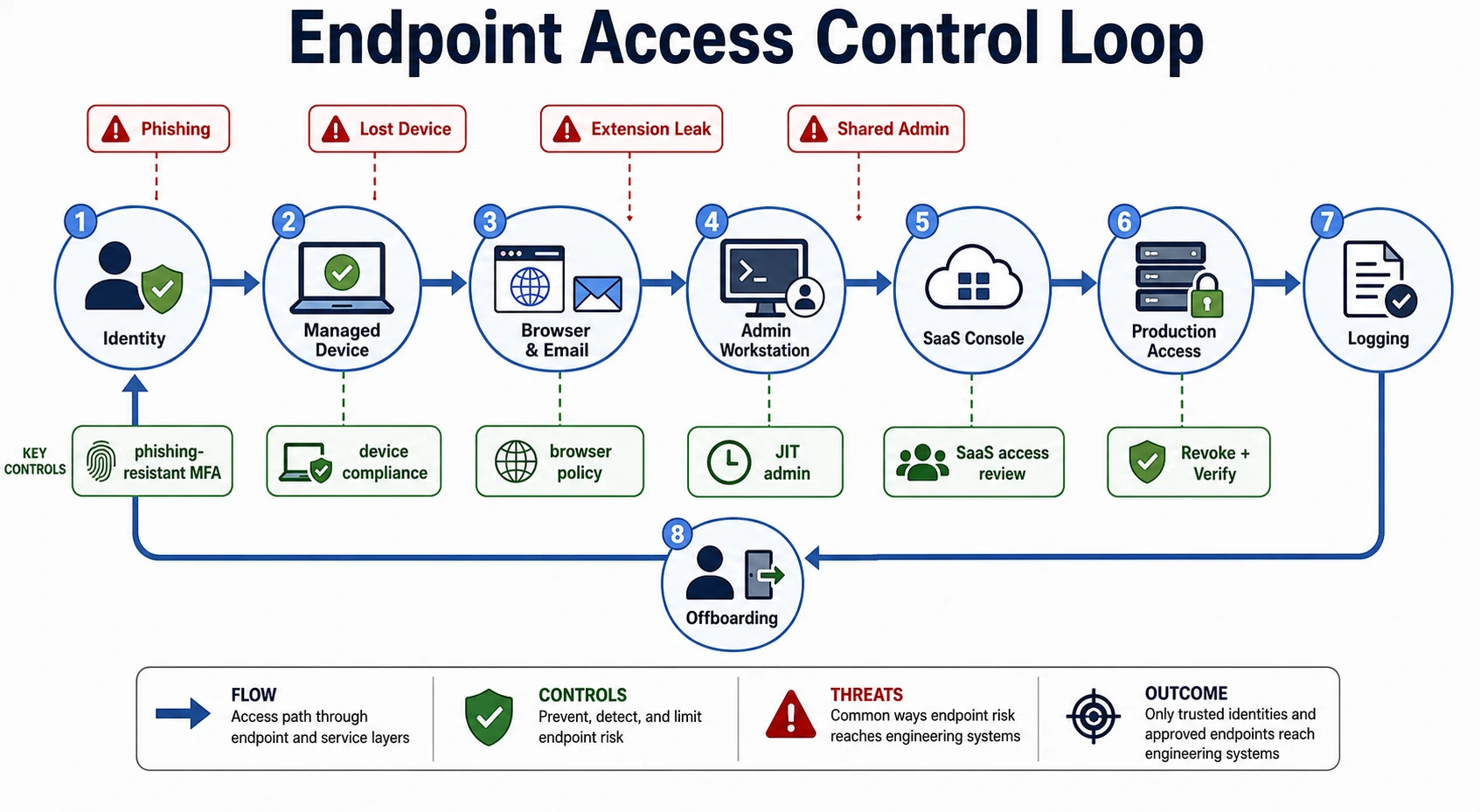
Begin with the authority on the device
Inventorying hardware is necessary, but the useful inventory begins with authority. For each workforce device, record the assigned user, management identity, supported operating-system state, encryption and recovery-key custody, endpoint agent health, device certificates, local administrator policy, approved browser profiles, last check-in, and remote containment capability. Then classify the systems the device can reach: ordinary collaboration, source code, customer data, production, identity administration, security tooling, finance, or other high-impact consoles.
That record changes the lost-laptop response. Responders know that the staff engineer’s ordinary identity reaches source control and observability, while production approval requires a separate privileged identity on a hardened profile. They can revoke known certificates and sessions instead of treating a password reset as universal containment.
Access policy should consume device state, not merely collect it. Sensitive applications should require a managed, recently healthy device with the relevant baseline. A device that is stale, unenrolled, missing critical controls, or reported lost should stop satisfying that condition. Exceptions need a named owner, narrow applications, compensating controls, and an expiry; “developer productivity” is not a boundary.
Endpoint baseline checklist
For a new or rebuilt endpoint, require and retain evidence for each of these conditions:
- The device is assigned in inventory, enrolled in management, and bound to an individual workforce identity. Recovery routes and ownership are known.
- The operating system is supported; full-disk encryption, automatic security updates, screen lock, secure configuration, and time synchronization are enforced. Encryption status is visible remotely rather than assumed from policy.
- Endpoint prevention and detection are active and tamper-protected. The operations team has tested alert delivery, device isolation, evidence collection, remote lock, and remote wipe where those actions are supported.
- A managed browser profile applies safe-browsing, download, credential-storage, certificate, and extension policy. Approved extensions have an owner, permissions review, and removal path.
- Local elevation is absent or time-bound. Its grant, use, and expiry produce telemetry; separate privileged identities and hardened administrative paths are used for higher-impact systems.
- Device posture gates source-code, customer-data, production, and administrative applications. A deliberately noncompliant test device is denied.
- The organization can join device, identity, browser, SaaS, and privileged-access events through stable user and device identifiers. The retention period supports investigation.
- A disposal or reassignment procedure removes organizational data, keys, certificates, management records, and prior-user recovery paths, with completion evidence.
The baseline should produce denials as well as green dashboards. Test an outdated device, disabled endpoint agent, unapproved browser extension, expired exception, and reported-lost state. A control that cannot withdraw access is only an observation.
Make workforce identity resist capture and recovery abuse
Every employee, contractor, service-desk operator, administrator, and break-glass user needs an individually assigned identity with a lifecycle owner. Group membership should express a current job function. Broad standing groups such as engineering-admin or “temporary production access” conceal authority; sensitive elevation should be approved, time-bound, logged, and allowed to expire.
Phishing-resistant authentication is most urgent where one account can change other accounts or reach engineering control planes: identity and device management, source control, cloud and production consoles, CI/CD, security tooling, password vaults, customer support, finance, and SaaS administration. Hardware-backed or platform authenticators that verify the legitimate service resist credential replay better than passwords, SMS codes, or routine approval prompts. The recovery path must meet the same risk. A help-desk call that replaces a strong authenticator after weak identity proof simply moves the attack.
Phishing-resistant MFA rollout checklist
Roll out from authority and recovery, not from headcount:
- Inventory applications, human identities, non-human identities, authentication protocols, local accounts, recovery routes, and current session lifetimes. Rank the applications by the authority and data an account compromise would expose.
- Verify that the chosen authenticators and enrollment process provide phishing-resistant authentication for the target application. Plan at least two usable authenticators or a controlled recovery route for high-impact users; avoid creating a single lost-key outage.
- Secure enrollment. Require an already trusted session or supervised identity proof, record who enrolled each authenticator, alert on new enrollment, and prevent a newly recovered account from silently registering another factor.
- Pilot with administrators and a representative set of device types, locations, accessibility needs, and emergency workflows. Test sign-in, step-up, device replacement, lost authenticator, travel, offline work, and provider outage.
- Enforce first on privileged and high-impact applications. Remove weaker fallback methods rather than leaving them available indefinitely, and identify service accounts or legacy clients that need a separate migration instead of a shared human bypass.
- Shorten or re-evaluate existing sessions where the risk warrants it. Strong authentication at the next login does not invalidate tokens issued under the old policy.
- Measure enrollment, enforcement, fallback use, recovery attempts, administrator exceptions, and applications still accepting weaker paths. Give every exception an owner and end date.
- Rehearse authenticator loss and identity-provider disruption. Confirm that emergency access is independently stored, narrowly held, alerted, reviewed after use, and rotated when its secrecy may have changed.
For the lost laptop, the authenticator protects a new login; it does not prove that every active browser session is harmless. Session revocation and device distrust remain separate operations.
Treat email, browsers, and collaboration as one execution surface
An endpoint compromise often begins in email and completes in the browser. Email controls should authenticate organizational sending domains, analyze suspicious attachments and destinations, warn about impersonation, support user reporting, and let responders search and remove a malicious campaign quickly. When a user reports a message, the response path should identify other recipients and clicks, preserve the message, inspect mailbox rules and delegated access, and revoke affected sessions and tokens.
Awareness cannot compensate for a workflow in which a copied password and an approval prompt authorize a production-capable session. Reduce password entry with SSO, require phishing-resistant authentication for consequential access, bind access to managed device state where possible, and make privileged elevation short-lived.
The browser deserves the same engineering attention as any application platform. It holds sessions for source review, cloud consoles, support systems, password managers, and internal tools. An extension may read pages, alter forms, observe clipboard data, or exfiltrate tokens across several of them. Use managed profiles, an allowlist or tightly governed installation path, permission review, inventory, update control, and removal evidence. An approved extension that later requests broader permissions should trigger a new decision.
Chat, documents, tickets, meetings, and knowledge bases extend this surface. They accumulate architecture diagrams, customer examples, incident details, vulnerability reports, support exports, screenshots, and occasional credential fragments. Set guest, public-link, retention, export, bot, and application rules according to that content. Sensitive incident rooms need controlled membership and evidence preservation. Production changes, access grants, and risk exceptions may be discussed in chat, but their authority should end in a durable system of record.
Separate administration from ordinary work
The staff engineer’s privileged approval is safer only if its path is truly separate. A second username in the same everyday browser, sharing extensions, downloads, cookies, and token storage, creates little isolation.
Identity, device, cloud, production, source-control, security-console, and high-impact SaaS administrators should use hardened workstations or administrative profiles. Those environments should exclude ordinary email and browsing, block unmanaged extensions, enforce a stronger device baseline and phishing-resistant authentication, prevent credential export where possible, and support rapid isolation. Privileged sessions should be short, attributable, and recorded when the system’s risk warrants it. Local administrator rights on developer machines should likewise be absent or time-bound, with approved tooling and use telemetry.
Break-glass access must remain possible during an identity or device-management outage without becoming a convenient parallel entrance. Keep it outside the ordinary identity dependency, restrict and periodically verify its holders, protect its credentials, alert on every use, and rotate or re-establish it afterward. A drill should prove that responders can enter and that normal users cannot.
Correlate the weak signals
Endpoint protection must support prevention, detection, containment, and evidence collection. Agent installation alone proves none of these. Operators need current health telemetry and exercised response actions for suspicious processes, credential access, persistence, unapproved remote-control tools, unusual scripts, disabled controls, and risky extension behavior.
The decisive signal may live elsewhere. A suspicious process becomes more consequential when the same user soon creates an OAuth grant, downloads an unusual volume of source, exports support data, changes an identity policy, or enters a production console. Preserve stable user, device, session, application, and privileged-role identifiers so responders can build that sequence. Define who owns the alert and test at least one joined path from endpoint event to identity or SaaS containment.
For the missing laptop, record the last trustworthy device check-in, last unlock if available, management commands and results, identity and SaaS activity, privileged session history, certificate use, source-control activity, and production access. Absence of an alert is not proof of absence when the device stopped reporting.
Govern SaaS as an engineering control plane
An identity provider, source host, CI/CD service, ticketing system, observability platform, support tool, password vault, or document store can grant authority, export data, install automation, weaken retention, disable logs, or invite outsiders. Each high-impact service needs a business owner and technical operator, named administrators, an SSO and MFA decision, app and OAuth inventory, log and alert path, guest and sharing policy, export and retention settings, support-access terms, emergency contact, and tested offboarding route.
SaaS admin access review checklist
For each service, begin with the current administrator export rather than an old ticket. Resolve these questions:
- Does every administrator map to a current individual or deliberately controlled emergency account? Are role and standing access still required?
- Can administrators bypass SSO or the expected MFA policy? Are recovery accounts, vendor support access, delegated roles, and domain-level owners included in the review?
- Which OAuth apps, API tokens, bots, and automation identities can administer, export, invite, or change policy? Who owns them, and when were they last used and reviewed?
- Can an administrator create public links, add guests, change retention, disable audit logs, alter identity provisioning, or export sensitive data? Are the most consequential changes alerted or independently approved?
- Are audit logs available for the required investigation period, retrievable during a provider incident, and routed to an owner? Has the team observed a test administrator change end to end?
- Does SCIM or other lifecycle automation fail visibly? Compare the service’s live users and roles with the identity source; do not treat a successful sync status as reconciliation.
- Can the organization remove the last administrator, transfer automation, revoke tokens, preserve required records, and recover emergency access without vendor improvisation?
Remove unused administrators and expire temporary roles during the review. Rotate ownerless tokens or disable their workloads safely. An exception should name the excess authority, owner, compensating controls, and reapproval date.
Offboarding is a revocation test
Offboarding tests whether the access chain was ever understood. Disabling the central identity may leave active sessions, refresh tokens, personal access tokens, OAuth grants, local data, device certificates, password-vault access, shared mailboxes, SaaS-local accounts, recovery methods, and physical credentials. It may also strand repositories, automation, scheduled jobs, security alerts, incident roles, and vendor contacts.
Transfer ownership before routine access disappears. Then disable the workforce identity; revoke sessions and registered authenticators; remove groups and privileged roles; revoke or rotate personal tokens and certificates; recover, lock, or wipe devices; remove SaaS-local and recovery access; and verify physical revocation. Preserve records required for security, legal, privacy, or business purposes without keeping the person’s authority alive.
The completion record should show the authoritative identity disabled, live memberships reconciled, sessions revoked, device disposition, credentials handled, ownership transferred, and unexpected post-offboarding attempts reviewed. High-risk departures may justify a faster sequence, narrower advance notice, and enhanced monitoring, but the decision should be based on specific authority and exposure rather than job title alone.
Lost device playbook
Treat a lost or stolen endpoint as an incident whose initial scope is the authority reachable from the device.
- Establish the device and time window. Record the reporter, assigned user, asset identifier, loss time and location if known, last trusted check-in, encryption and screen-lock state, management status, local data, user and privileged identities, and reachable high-impact systems. Preserve the user’s account without delaying containment.
- Distrust the device. Mark it lost in management and access systems, block its posture or certificates, and issue remote lock or wipe commands as policy and evidence needs allow. Record command acknowledgement separately from command issuance; an offline device may receive neither.
- Revoke reachable authority. Terminate central identity and SaaS sessions, privileged sessions, VPN access, device certificates, and exposed tokens. Reset a password when its secrecy may have changed, but do not mistake that for session or token revocation. Suspend production access immediately when the device carried administrative authority.
- Trace activity. Join endpoint, identity, email, SaaS, source-control, cloud, and production records from the last trusted state through containment. Look for new authenticators, mailbox rules, OAuth grants, tokens, exports, repository access, privilege changes, and attempts after revocation.
- Rotate by exposure. Rotate locally stored or exportable credentials, certificates, recovery material, and secrets accessed during the uncertain window. Avoid indiscriminate rotation that destroys evidence or causes an uncontrolled outage; record why each credential was or was not in scope.
- Decide the data and incident scope. Encryption and a locked screen reduce risk but do not erase the possibility of an already unlocked device, active remote session, copied local data, or stolen token. Document known facts, uncertainty, affected data or systems, notification escalation, and residual risk.
- Close with proof. Record recovery or wipe result, session and certificate revocation, credential rotations, activity review, device replacement baseline, and the accountable decision to close or continue the incident. If the original device returns, keep it distrusted until it has been examined or rebuilt under policy.
In the opening case, responders do not need to claim that the encrypted laptop was harmless. They can show that it stopped satisfying device policy, its ordinary and privileged sessions ended, its certificates and exposed tokens were handled, no unexplained activity crossed the time window, and its replacement began from a verified baseline. That evidence—not the inventory label “managed”—is what closes the access chain.